

Cursor 2025 - My Personal Stats & Open Book
Open book: my Cursor stats for 2025! 125+ billion tokens, 148,000+ messages, 202 coding days and a top 0.1% ranking among the most active Cursor users. A full breakdown of my activity with the AI development environment.
In 2025, Cursor shipped 16 versions with 26 models, including Bugbot, Cloud Agents, and version 2.0 with Composer 1. As in previous years, they also published personal statistics for every user in 2025.
You can access these statistics at cursor.com/2025 for your own Cursor account. Thanks to Marc from Diestelkamp Consulting I noticed that the 2025 stats are available. Since the email never reached me, I retrieved the stats this way. Below I’m sharing my usage stats and my analysis of Cursor usage throughout 2025.
Open book: here are my complete Cursor 2025 statistics:
Table of contents
001. 125+ billion tokens - token usage analysis
002. 148,169 messages & 24,778 chats - the agent on constant duty
003. 202 coding days - more than half the year
004. Top <0.1% ranking - one of the most active users
005. Tab key used 422 times - AI completion usage analysis
006. Usage patterns - when and how much I use Cursor
007. Personal perspective - 25 years of development experience
008. Conclusion - what the numbers really mean
125+ billion tokens - the unbelievable numbers
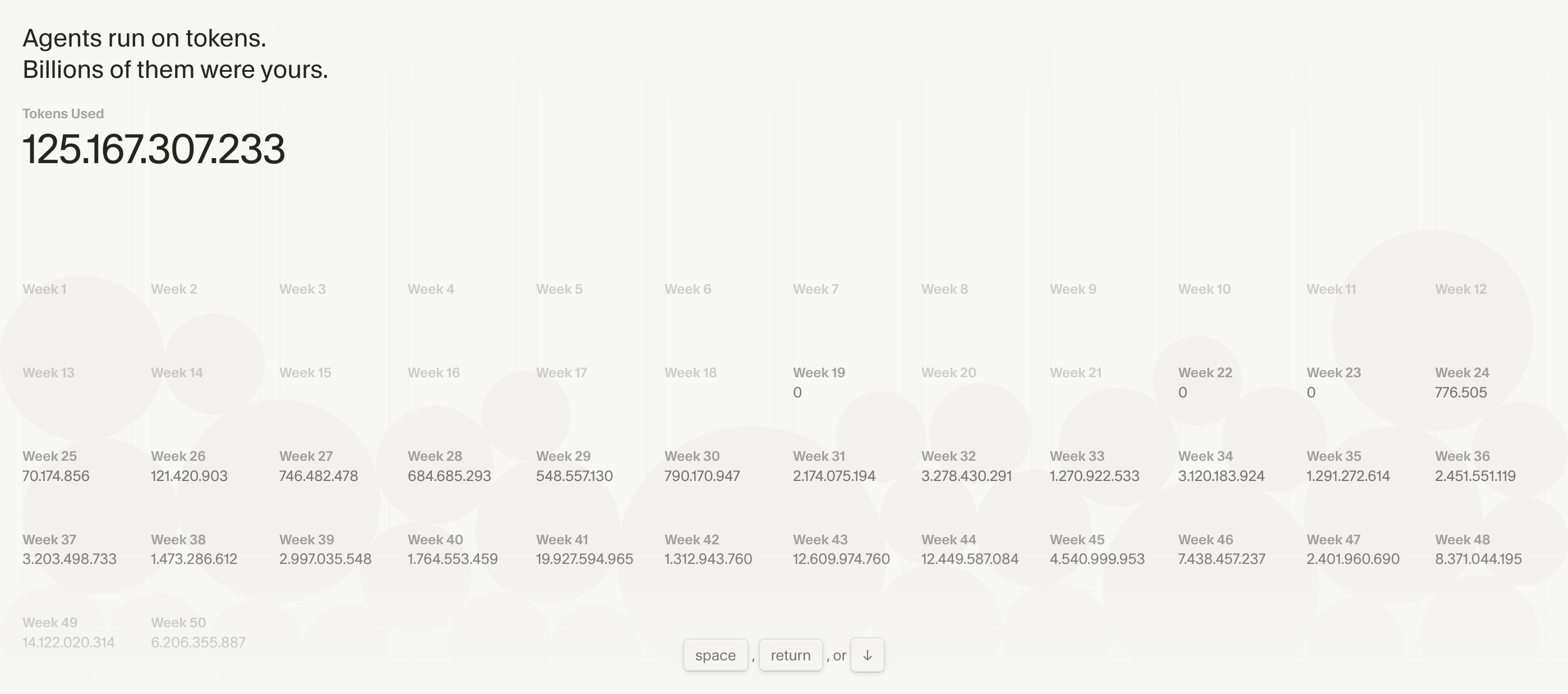
125,167,307,233 tokens — that’s over 125 billion tokens.
The week-by-week breakdown shows: in the first months (weeks 1–24) usage was still low. From week 25 (late June), intensive usage began:
- Week 31: 2.17 billion tokens
- Week 32: 3.28 billion tokens (maximum in that phase)
- Week 34: 3.12 billion tokens
- Week 41: 19.93 billion tokens
- Week 43: 12.61 billion tokens
- Week 44: 12.45 billion tokens
- Week 49: 14.12 billion tokens
Week 41 (October) shows the highest value with almost 20 billion tokens. That week correlates with an intensive development cycle.
What does that mean in practice?
Every token represents a piece of code, a line, a comment, or a prompt. 125+ billion tokens indicate heavy usage: prototyping, code generation, refactoring, and optimization. Cursor became the primary development tool for large parts of 2025.
148,169 messages & 24,778 chats - the agent on constant duty
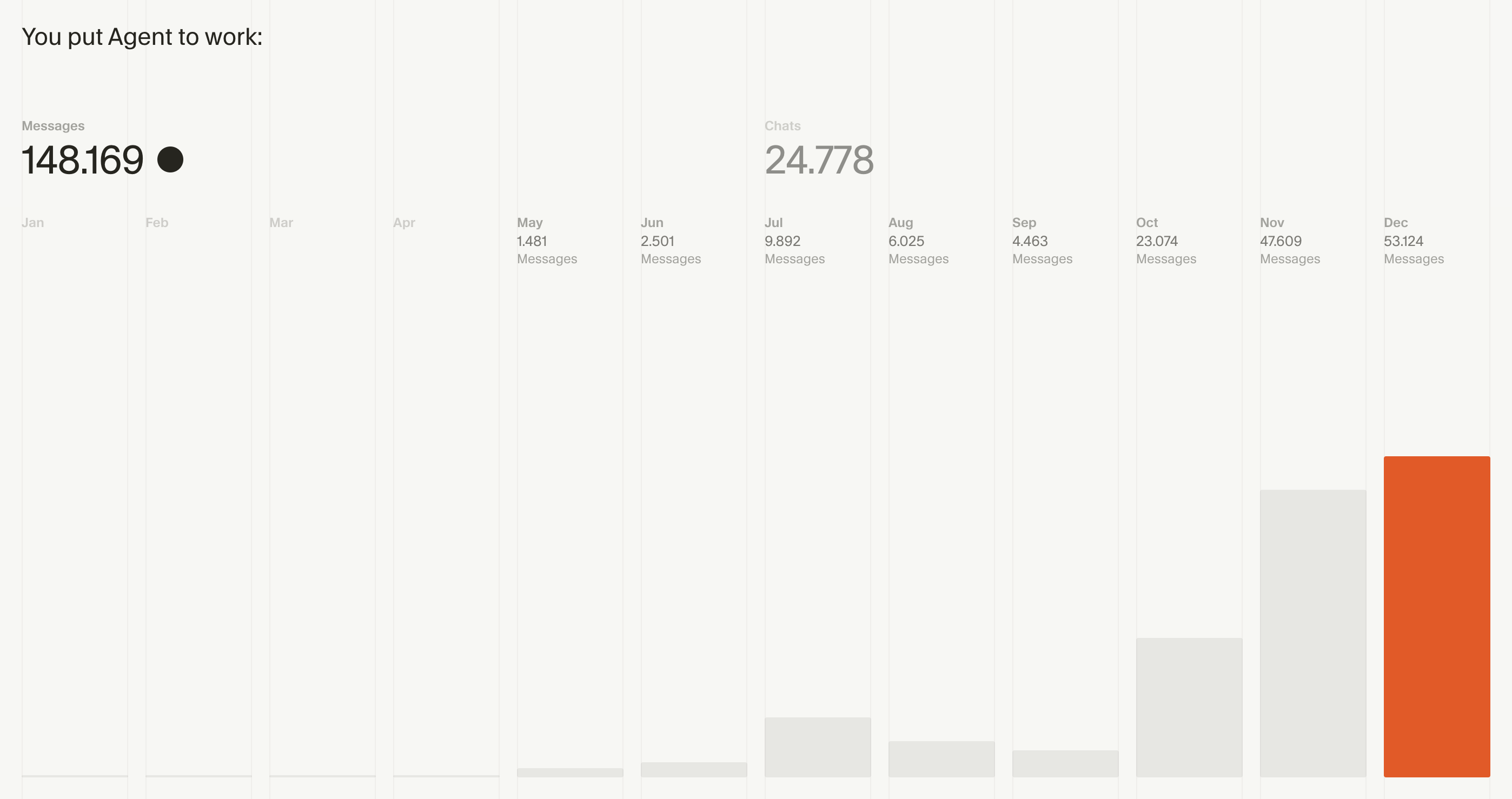
148,169 messages across 24,778 chats — that’s an average of roughly 6 messages per chat.
The development over the year shows a clear pattern:
- May: 1,481 messages — early usage phase
- June: 2,501 messages — first increase
- July: 9,892 messages — noticeable growth
- October: 23,074 messages — strong increase
- November: 47,609 messages — highest value
- December: 53,124 messages — maximum
December shows the highest value with over 53,000 messages in one month. This highlights the growing integration of Cursor into my development process. Over the year, Cursor shifted from being used for individual tasks to being a continuous part of my workflow.
The 24,778 chats also show that I work very structured — each chat is a project, a task, a feature. I start a new chat when the context changes, so the AI has the full context.
202 coding days - more than half the year
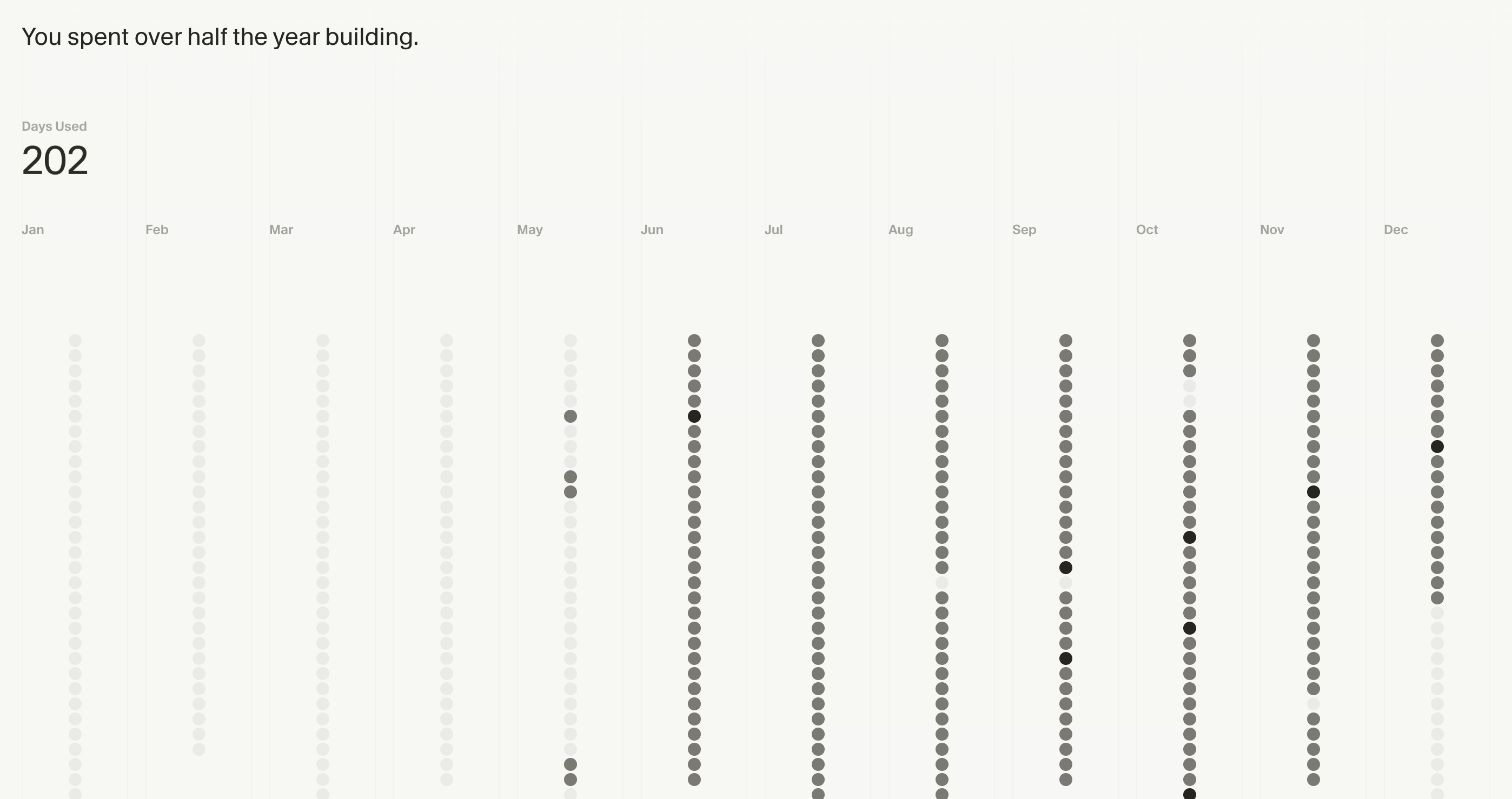
I used Cursor on 202 days — that’s over 55% of the year.
The visualization shows the progression very clearly:
- January – April: low activity (planning phase, other projects)
- May: first activity, cautious start
- June – September: high activity, almost daily usage; darker dots indicate heavy usage
- October – December: consistently high, with varying intensity
202 days means: on more than 55% of all days in 2025, Cursor was actively used.
Observations:
June to September show the highest activity — most development work happened in this phase. Projects were completed, new features implemented, and refactorings done. Cursor was a fixed part of the workflow during that time.
Top <0.1% ranking - one of the most active users
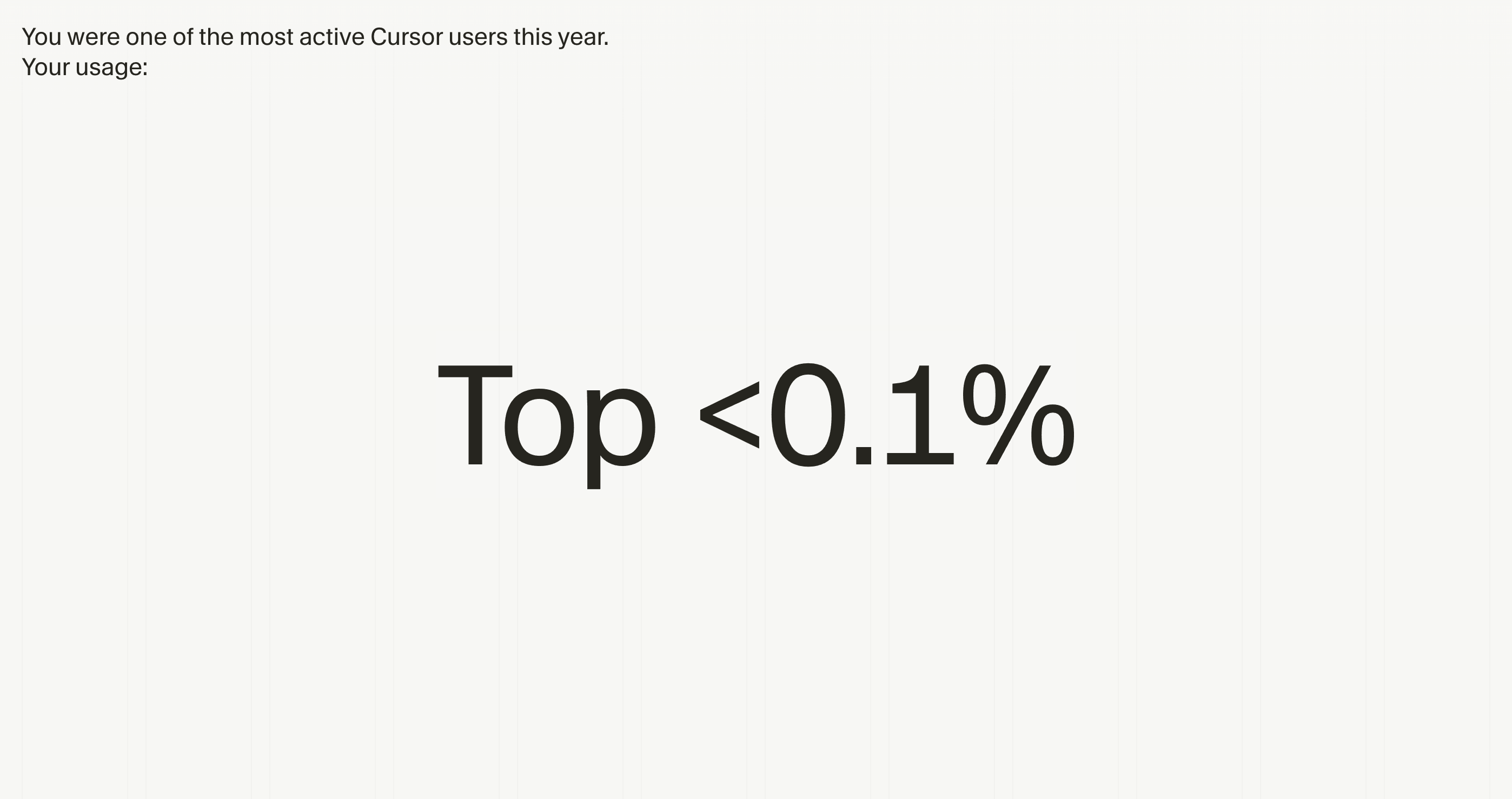
Top <0.1% — I’m among the most active 0.1% of Cursor users worldwide.
According to Cursor, there are roughly one million users worldwide, with about 300,000 paying users. If we take those 300,000 paying users, a top 0.1% ranking means being among roughly the 300 most active users.
This number shows usage intensity: a single developer can reach a top-300 ranking by systematically integrating Cursor into the development workflow. This is not a statement about quality — it’s an indicator of intensity and integration.
What it means for the development workflow:
The ranking shows that Cursor wasn’t merely “tested” — it was integrated as a central tool into the workflow. The numbers (125+ billion tokens, 148k+ messages, 202 days) confirm that integration.
At the same time, the ranking shows that there is an active community of developers using Cursor in a similarly intensive way. The power-user community is growing steadily.
Tab key used 422 times - my personal favorite
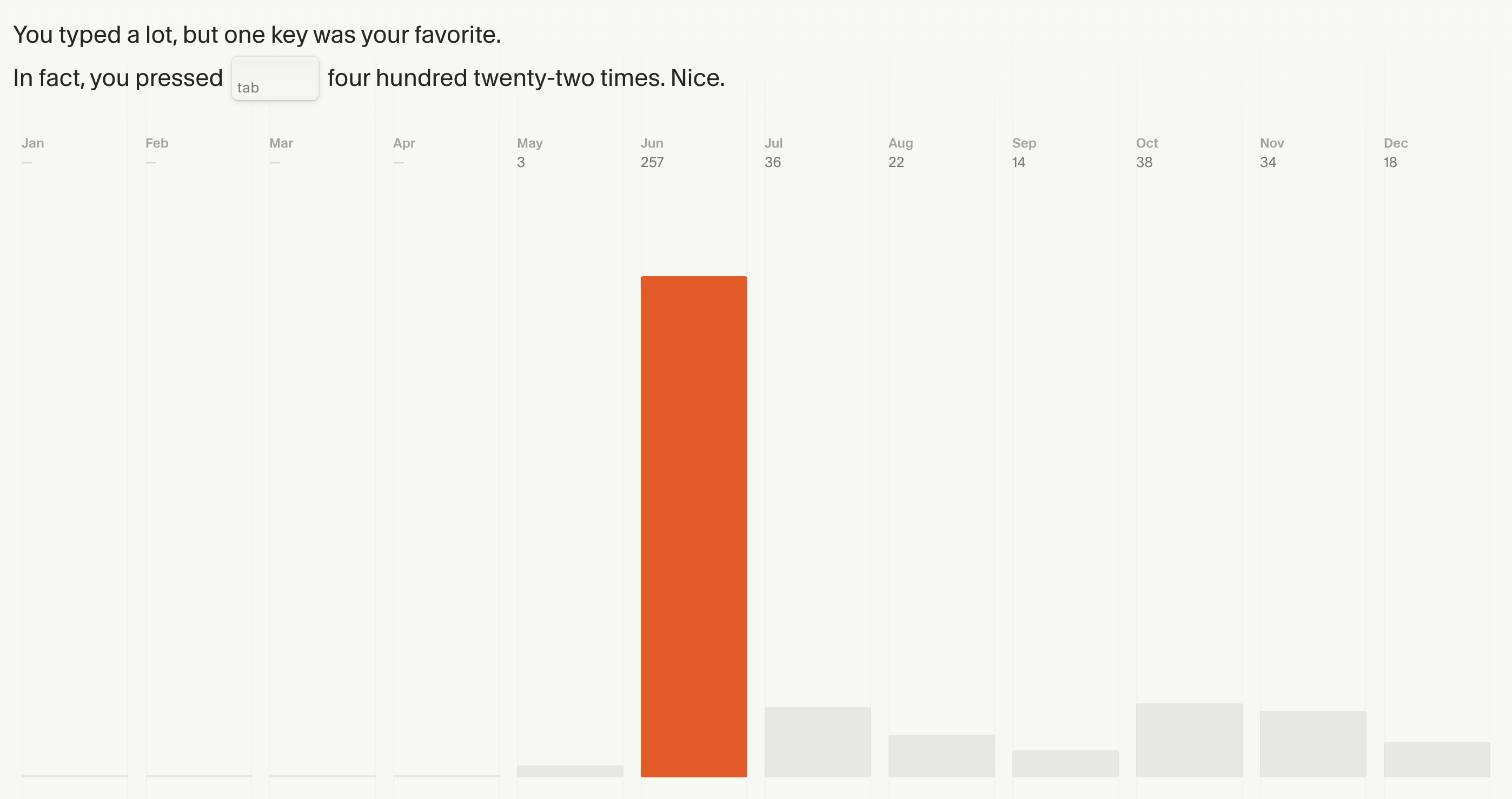
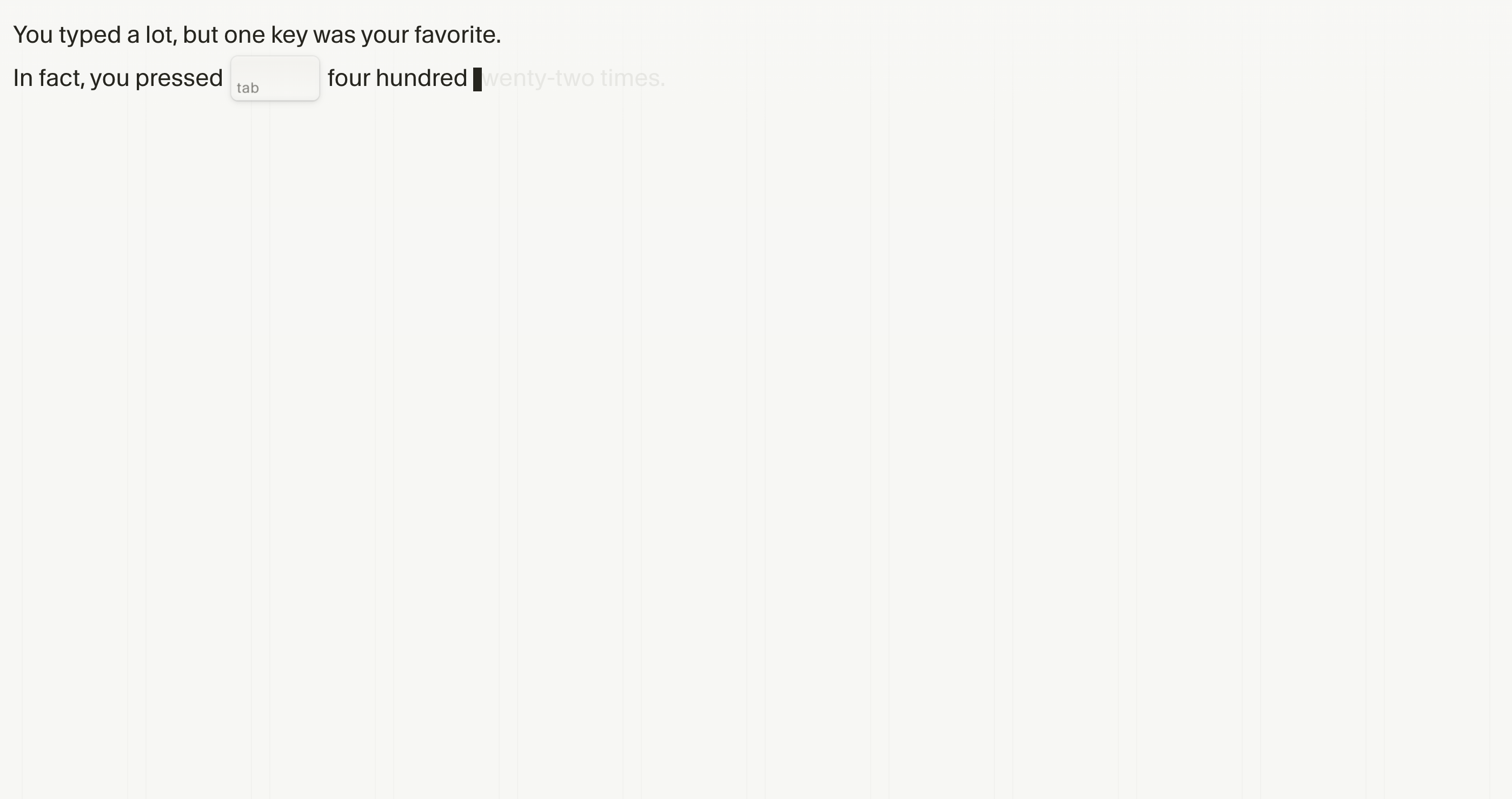
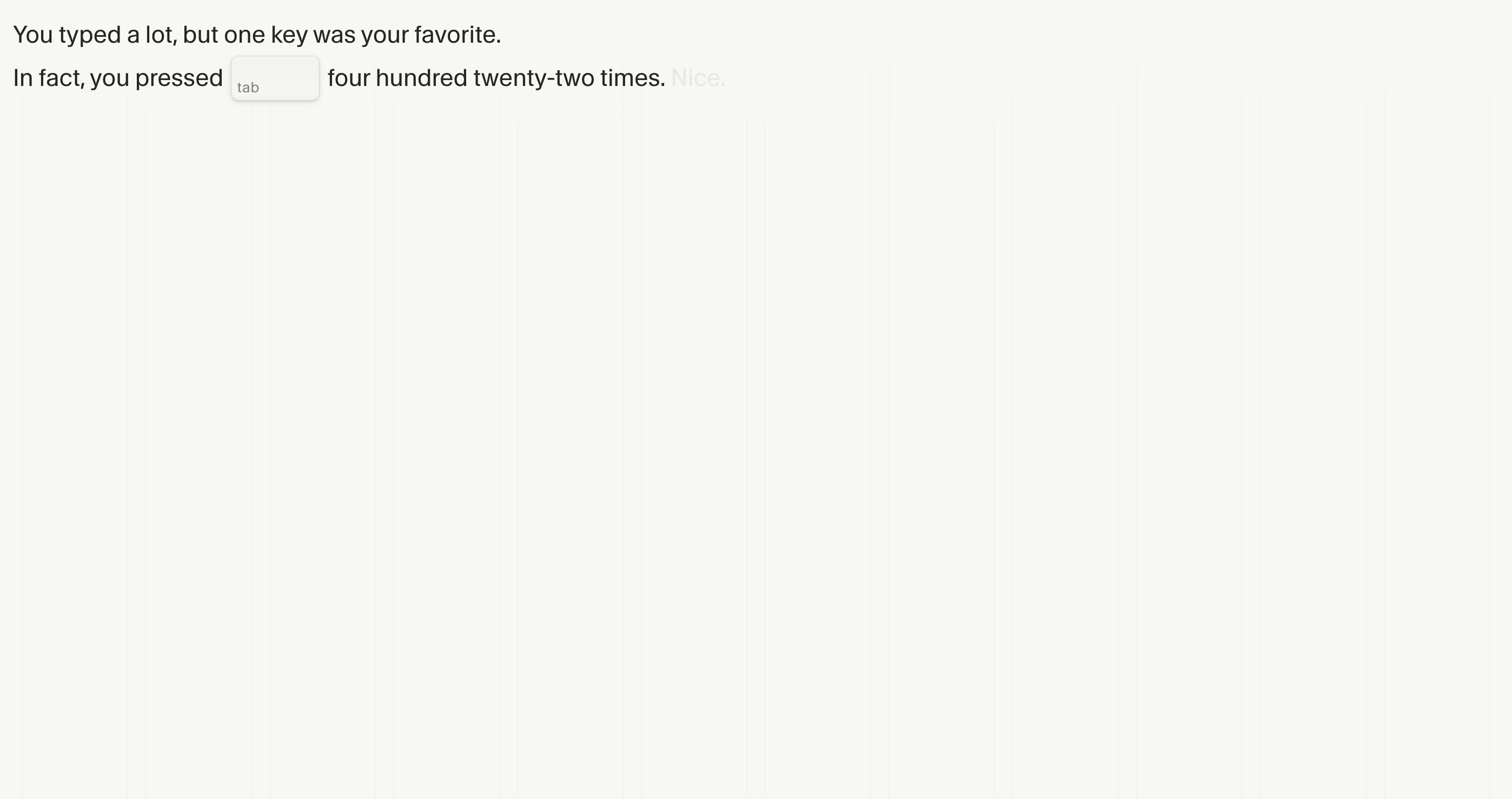
The Tab key was used 422 times to accept AI completions.
The monthly distribution shows:
- June: 257× Tab
- July: 36× Tab
- August: 22× Tab
- October: 38× Tab
- November: 34× Tab
- December: 18× Tab
June shows the highest value with 257× Tab in one month — about 8× per day.
In Cursor, the Tab key accepts AI completion suggestions. 422× Tab indicates a high acceptance rate of AI suggestions.
The decline in Tab usage over the year could have two reasons:
- Better prompt quality leads to more precise suggestions (fewer iterations)
- Increasing use of alternative workflows (e.g., chat instead of completions)
This development shows a learning curve in the tool usage.
Usage patterns - when and how much I use Cursor
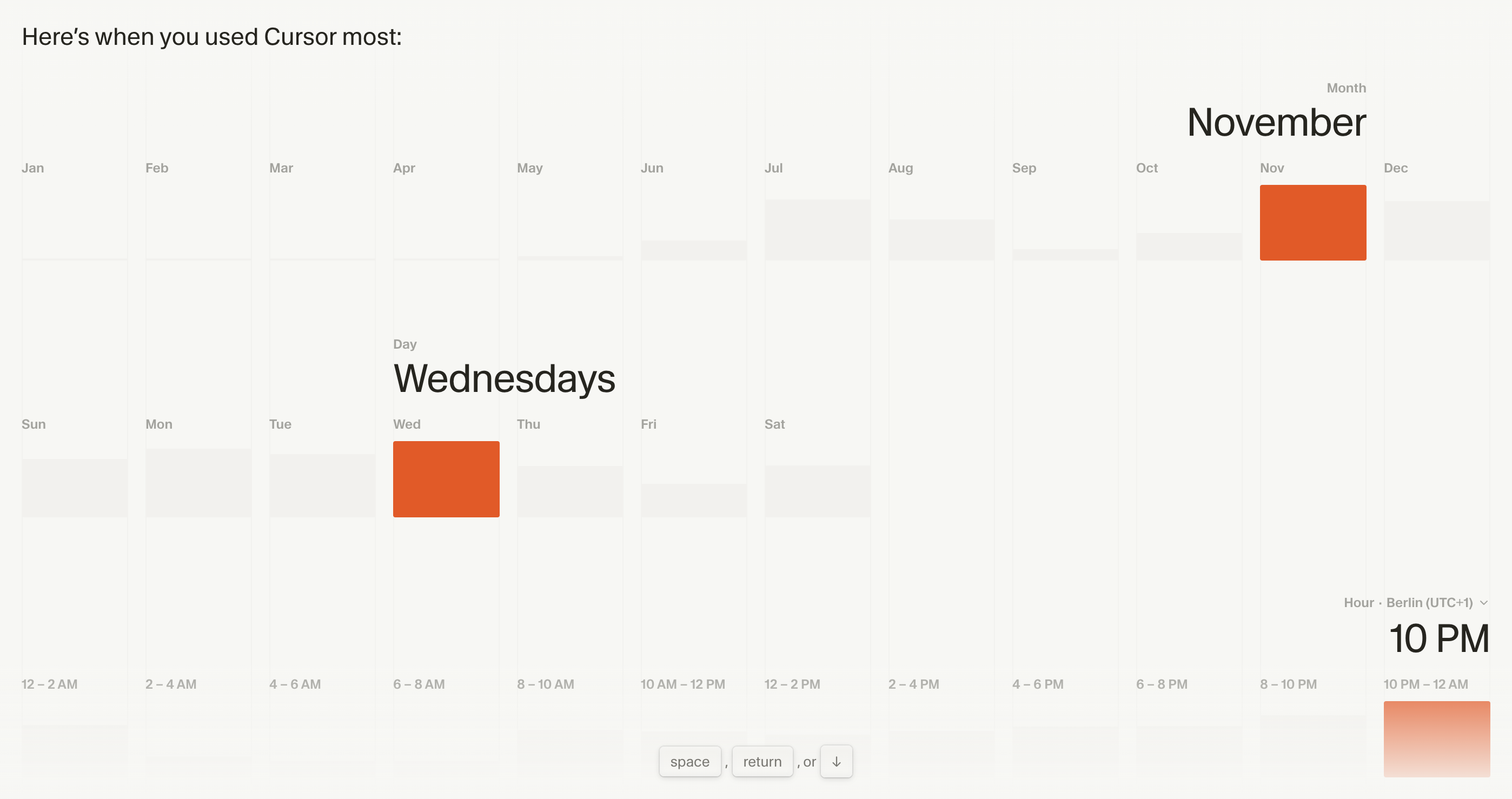
Usage patterns over time
The statistics show the following patterns:
- Month: November shows the highest activity
- Weekday: Wednesday is the most active day
- Time: 10:00 PM – 12:00 AM is the main working time
10:00 PM – 12:00 AM as main working hours enables focused work without distractions. Cursor supports this workflow effectively through continuous assistance, keeping productivity high even during long sessions.
Wednesday as the most active weekday sits in the middle of the week — the rhythm is established, but there is still enough time before the weekend for larger development projects.
November as the most active month correlates with an intensive development cycle. The 47,609 messages in November confirm this intense phase.
Personal perspective - 25 years of development experience
I’ve been programming since I was 8 years old. That’s now more than 25 years of writing code, building systems, and leading teams. Over that time I’ve seen an enormous amount of code — from different developers, teams, languages, and architectures.
Many roles, many perspectives
In my career I’ve taken on different roles: as a CTO I developed technical strategies and led teams. As a developer I wrote code daily and implemented features. As a system administrator I configured servers, set up monitoring, and optimized infrastructure. As a frontend developer I built UIs and implemented UX. As an architect I designed systems and made technical decisions.
Each role gave me a different perspective. I’ve seen teams that collaborated brilliantly and teams that failed due to communication issues. I’ve seen code that was elegant and maintainable, and code that made maintenance painful. I’ve experienced projects that succeeded and projects that failed — often for the same reasons.
A structural shift in software development
The last 25 years have shown continuous evolution in IT. However, current AI development tools like Cursor represent a structural shift that fundamentally changes development processes.
This is a paradigm shift in software development. Developers no longer work in isolation, but together with AI systems. Complexity becomes easier to manage because AI supports structure and implementation. More productive ways of working become possible because routine tasks can be automated.
The importance of early adoption
Developers who don’t engage with AI development tools like Cursor now will miss a development that will permanently change the field. This is a professional assessment based on 25 years of industry experience.
Everyone can make their own choices. But developers who start later will find that the entry becomes significantly harder. The learning curve rises over time because best practices and workflows become established. Early adoption makes it possible to actively shape these developments instead of chasing them.
Real projects with Cursor
The Cursor stats I’m sharing here didn’t come from experiments or test projects. They come from real projects I built with it:
- seoday-website: the entire SEO-Day website was built with Cursor — from architecture and services to templates.
- Internal processes: many internal workflows and automations were built with Cursor (data migrations, cron jobs, processing pipelines).
- Client projects: various client projects benefit from the efficiency Cursor enables: faster development, better code quality, fewer bugs.
- seo-day.de/jobs/: a complete job portal for SEO positions.
- seo-day.de/wiki/: a wiki system launched in November 2025 during intense Cursor usage.
- mallorcazeitung.news: a project currently in development, showing Cursor’s value even for larger projects.
These projects show that Cursor isn’t just suitable for small scripts or prototypes — it also works for productive, production-ready systems. Especially the wiki project from November demonstrates the potential for fast development without sacrificing quality.
Outlook: projects for the next quarter
Many projects are planned for the next quarter. Conversations with various exchange partners show the potential of Cursor and similar tools for many use cases.
Work-life balance as a challenge
Intensive development work can reduce sleep. This is a known challenge during phases of high project intensity.
At 43, I had to restructure my sleep rhythm. The typical trap — too little sleep, working late into the night, being tired the next day — is not sustainable.
A healthy rhythm is essential long-term. Sustainability is the key to long-term productivity. Developers have to take care of their own resources to remain productive continuously.
The developer perspective
From a professional perspective, tools like Cursor enable better code quality, faster development, and more efficient approaches to complex problems. This is not a shortcut — it is efficient development through optimized workflows.
Developers using Cursor don’t just gain tool skills. They develop new ways of working, patterns, and approaches. These experiences increase long-term productivity, regardless of whether they continue using Cursor or switch to alternatives.
Conclusion - what the numbers really mean
125+ billion tokens, 148,000+ messages, 202 coding days, top 0.1% ranking — these numbers show intensive usage. The question is: what do they mean professionally?
001. Cursor is not just a tool — it is a development partner
The intensity with which I use Cursor shows that it’s no longer a “nice to have” — it is essential to the way I work. Cursor doesn’t just help me be faster — it helps me be better: solving more complex problems, improving code quality, and exploring new approaches.
002. Open book matters
I share these numbers to include other developers and encourage exchange. If you have had similar experiences or have questions about my usage, I’d love to hear from you. I’m also interested in what statistics other developers achieved and how they use Cursor in their workflows. Sharing best practices and usage patterns helps the whole developer community.
003. The community is growing
The fact that a “top 0.1%” ranking is possible shows that the Cursor community is large and active. Many developers use Cursor similarly intensively — the power-user community continues to grow.
004. Workflow integration is everything
The numbers also show that Cursor isn’t used “once in a while” — it is fully integrated into my workflow. 202 days per year, mostly at night (10:00 PM–12:00 AM), mostly on Wednesdays — a pattern that shows how natural Cursor has become for me.
005. The future is hybrid
AI tools like Cursor are not “the future” — they are the present. The numbers show that we’re already living in a hybrid development world where human expertise and AI support go hand in hand.
Conclusion
2025 shows that Cursor has moved from an experiment to a fixed part of productive development workflows. The numbers show intensive usage and successful integration into different project types.
Thanks to Marc from Diestelkamp Consulting for the heads-up about the available statistics.
Comparing usage statistics
How do other developers use Cursor? Comparable statistics help identify best practices and better understand the tool’s development. You can retrieve your own stats at cursor.com/2025 and share them with me.
Screenshots - all stats in detail
Here are all screenshots of my Cursor 2025 stats in detail: